Is Flighty Pro worth it? What $59.99 a year buys

By Mike Dalton
Flighty Pro costs $59.99 a year, $9.99 a month, or $299 for lifetime access. It is worth it if you fly often enough that hearing about a delay before the airline announces it changes what you do: you rebook from the lounge, you warn the person picking you up, you run for a connection you would otherwise have missed. If what you want is your flight's status next to the rest of the trip, the free version, or a trip app that already holds your bookings, may be all you need.
That is the answer. The rest of this post shows what you get without paying, what Pro adds, who it is for, and what to use if you are on Android.
What Flighty Pro costs
The US App Store lists these prices for Flighty Pro:
| Plan | Price |
|---|---|
| Pro, yearly | $59.99 |
| Pro, monthly | $9.99 |
| Pro, lifetime | $299 |
| Family, yearly | $119 |
| Family, monthly | $15.99 |
| Family, lifetime | $449 (or $199 to add family to an existing lifetime plan) |
The listing also shows a $4.99 Pay-As-You-Go plan. Flighty's site does not say what period it covers, so check the price screen in the app before you choose it. Flighty's pricing page shows the yearly plan as "$4.99 per month", which is the same $59.99 billed once a year.
There is no free trial measured in days. Instead, "your first flight includes Flighty Pro for free", so you see every feature on one real trip before you pay.
Prices checked on November 4, 2026, on the US App Store and flighty.com.
What the free version of Flighty already does
More than most people expect. The free version tracks unlimited flights with what Flighty calls live pilot-grade data, and keeps a log of where you have flown in Flighty Passport, going back 365 days. You can share a flight with Flighty Friends so they can follow it. If you fly a few times a year and mostly want to know whether your flight is on time when you check, the free version answers that.
What free does not do is come to you. The alerts, the predictions, and the Live Activity on your lock screen are Pro.
What Flighty Pro adds
Flighty lists its Pro features on its "Why subscribe" page. Here they are by when they matter, with Flighty's own names.
Before anyone else knows: Alerts Before Airlines, Delay Predictions, Gate Predictions, Late Plane Alerts, Where's My Plane, and Arrival Forecast.
At the airport: Connection Assistant, Gate-to-Gate AI Guide, Airport Delay Trends, Live Airport Op Reports, Live ATC Advisories, Live Weather Delays, Decoded NOTAMs, and Alternate Direct Flights.
Everywhere else: Push Alerts, Live Activities, Calendar Sync, Email & TripIt Import, unlimited Passport history, and full access to Flighty Airports.
Three of those carry the subscription. Alerts Before Airlines is the one people quote: Flighty says it often tells you about a delay or a gate change before the airline's own notification arrives. Where's My Plane and Late Plane Alerts tell you that the aircraft you are about to board is still on the ground two cities away, which is often the first sign of a delay. The Connection Assistant tells you whether a tight connection still works and how to get between the gates.
| Free | Pro | |
|---|---|---|
| Track unlimited flights with live data | Yes | Yes |
| Flighty Passport history | 365 days | Unlimited |
| Push Alerts and Live Activities | First flight only | Yes |
| Alerts Before Airlines, Delay and Gate Predictions | First flight only | Yes |
| Where's My Plane and Late Plane Alerts | First flight only | Yes |
| Connection Assistant and Gate-to-Gate AI Guide | First flight only | Yes |
| Calendar Sync, Email & TripIt Import | No | Yes |
| Price | $0 | $59.99 a year |
Who should pay for Flighty Pro
Pay for it if you fly every month or more, you connect often, or a missed connection costs you real money or a meeting. Pay for it if you are the kind of traveler who rebooks from the gate before the agent makes the announcement, because that is exactly the window Pro buys you. Pay for it if you simply enjoy the aviation detail. Plenty of people do, and Flighty is the best app for it.
Skip it if you take a few trips a year, you fly one airline whose app already pushes delays and gate changes, or your trips are mostly hotels and trains with the odd flight. Skip it if you are on Android, because there is no Flighty for Android.
The fair case against Pro is the one frequent flyers make on Reddit: the big US airlines now push delays, cancellations, and gate changes for free, and the free version of Flighty still shows you everything when you open it. Pro earns its price on the margins, the twenty minutes of warning and the inbound-plane tip-off, and those margins matter a lot to some travelers and not at all to others. If you are unsure, take one trip with a connection on the free first-flight Pro and see whether the early warnings changed anything you did.
Flighty vs TripIt Pro
These two get compared because both will tell you your flight is late, but they start from opposite ends.
Flighty is a flight tracker with an itinerary import bolted on. It goes deeper than anything else on the flight itself, and it knows nothing about your hotel, your train, or your dinner reservation.
TripIt is an itinerary with flight alerts bolted on. You forward every confirmation and it builds the whole trip. Its Pro plan, at $49 a year, adds Flight Status, Alternate Flights, Seat Tracker, and Fare Tracker. Its alerts are good, and they are not as deep as Flighty's.
If the flight is the trip, pick Flighty. If the flight is one booking among many, pick an itinerary app. Is TripIt Pro worth it? goes through TripIt's sixteen Pro features the same way this post goes through Flighty's, and Wanderlog vs TripIt covers the itinerary apps side by side.
Flighty alternatives
On Android, Flighty is not an option, and its help page says there are no current plans for one. Reviewers compare it most often with newer Android trackers such as Aviate and byAir. We have not tested them, so look at their current free tiers before you subscribe.
For the whole trip, Whimbrel comes at the problem from the other side. You forward your booking confirmations to a private address, or connect Gmail, Outlook, Fastmail, or any inbox over IMAP, and an assistant files every flight, hotel, train, and reservation on the right day. Every flight with a flight number gets live status on the trip, and a push notification when it is delayed, cancelled, or diverted, when a departure gate is assigned or changes, and when the baggage belt is posted. The alert goes to everyone on the trip who is on that flight, so the friend you are meeting in Lisbon hears about your delay without you texting them. It runs in any browser, on Android from Google Play, and on iPhone from the App Store.
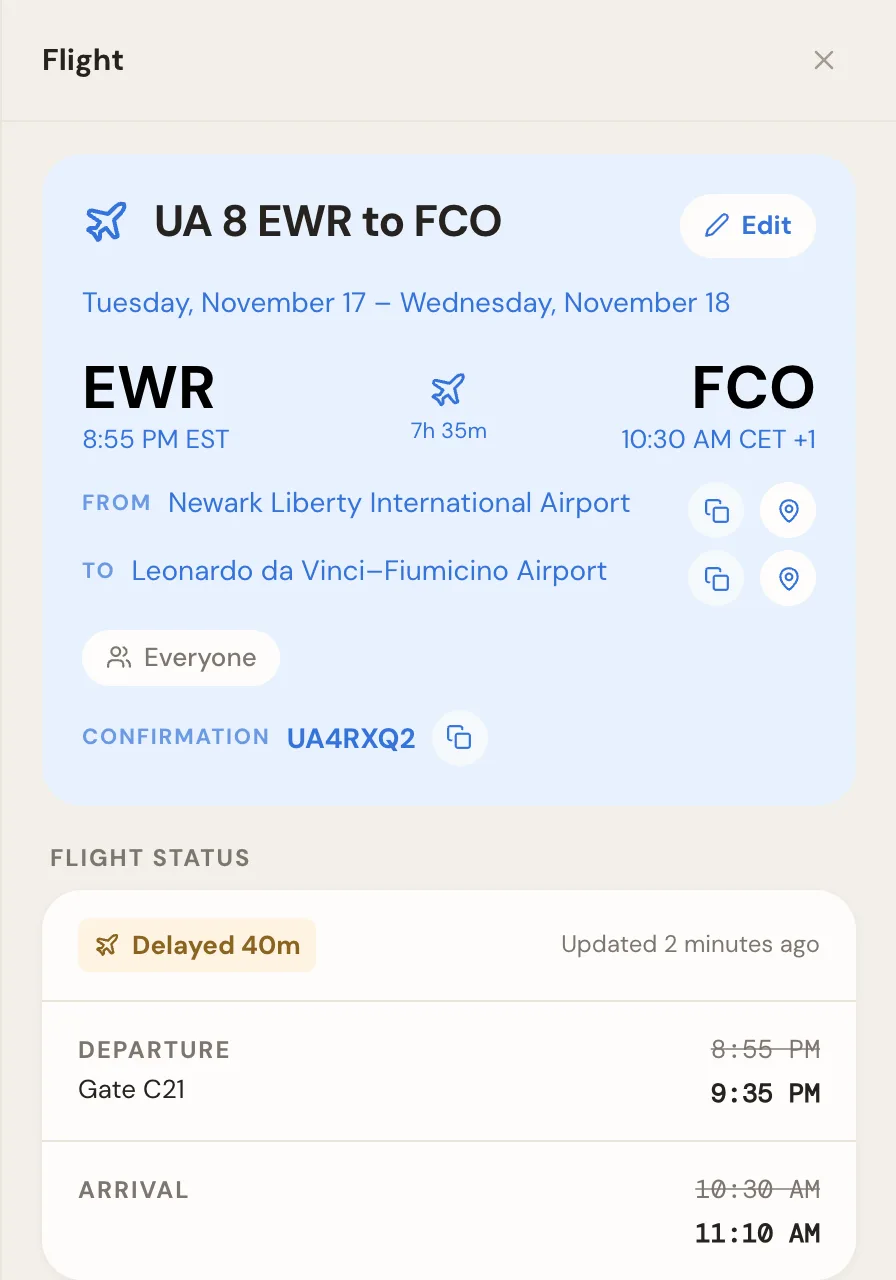
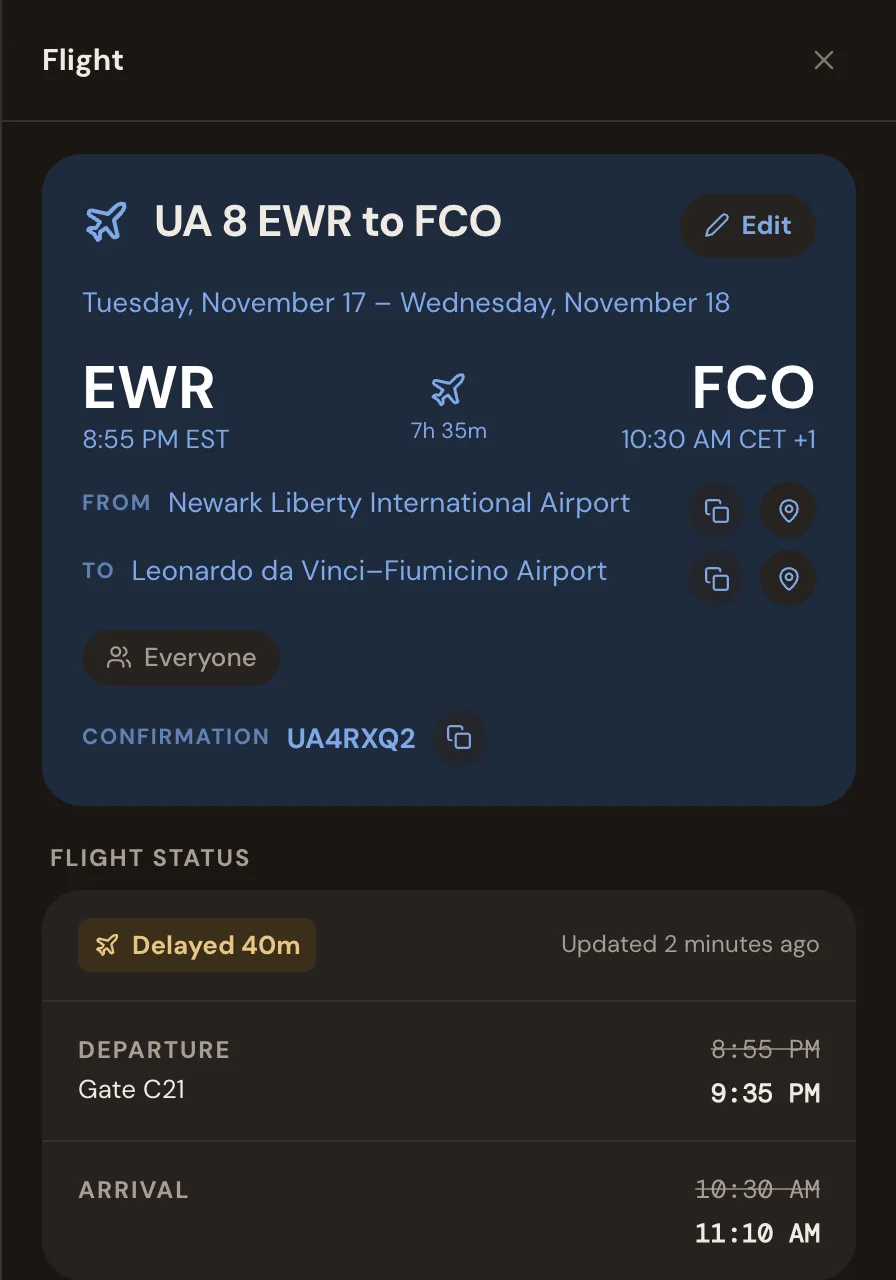
What Whimbrel does not do is the aviation layer. It does not predict delays, tell you where the inbound plane is, claim to beat the airline's own alerts, help with connections gate to gate, or put a Live Activity on your lock screen. If those are what you want, Flighty Pro is the better tool, and you can use both: Flighty for the flight, Whimbrel for the trip around it. Whimbrel is free today. Whimbrel Pro is coming for people with many trips a year or many people per trip, and everything you build now comes with you. The features page lists what it does today, and how it works shows a trip built from the first email.
Which to do first
Install Flighty and let the free first-flight Pro run through a real trip with a connection. If the early warnings changed what you did, pay for the year; at $5 a month it is cheap for someone who flies that much. If you mostly glanced at it the way you glance at the airline's app, keep the free version, and put the trip itself somewhere that already knows about your flights.
Frequently asked questions
- How much is Flighty Pro?
- In the US App Store, Flighty Pro is $59.99 a year, $9.99 a month, or $299 once for lifetime access. Family plans are $119 a year, $15.99 a month, or $449 for lifetime. Prices checked on November 4, 2026.
- What is the difference between Flighty and Flighty Pro?
- Free Flighty tracks as many flights as you like with live data and keeps a flight log in Flighty Passport. Pro adds the parts that act before you would notice, such as alerts before the airline sends them, delay and gate predictions, where your inbound plane is, and the Connection Assistant, plus Live Activities, calendar sync, and email import.
- Is there a way to get Flighty Pro for free?
- Every account gets Pro free for its first flight. After that, Pro is paid.
- Is Flighty available on Android?
- No. Flighty runs on iPhone, iPad, Mac, Apple Watch, and Apple Vision, and its help page says there are no current plans for an Android version.
- Is Flighty better than TripIt?
- For tracking flights, yes. Flighty is a flight tracker first and goes deeper on delays, gates, and connections. TripIt is an itinerary first, with flight alerts in its $49-a-year Pro plan. If you want your hotels and dinners in the same place as your flights, TripIt or a trip app like Whimbrel fits better.
- Is there a Flighty alternative that covers the whole trip?
- Whimbrel builds your itinerary from the booking emails you forward or from a connected inbox, and pushes each flight's delays, cancellations, gate changes, and baggage belt to everyone on the trip who is on that flight. It runs on the web, Android, and iPhone. It does not predict delays or track the inbound plane. Whimbrel is free today. Whimbrel Pro is coming for people with many trips a year or many people per trip, and everything you build now comes with you.